Git & GitHub Guide
What is Git?
Git is a distributed version control system used to track changes in source code. It allows developers to save different versions of their code, collaborate with others, and recover previous versions if something goes wrong.
Why Git is Important?
- Tracks complete history of code changes
- Helps multiple developers work on the same project
- Prevents code loss and mistakes
- Makes collaboration easier and safer
How Git Works?
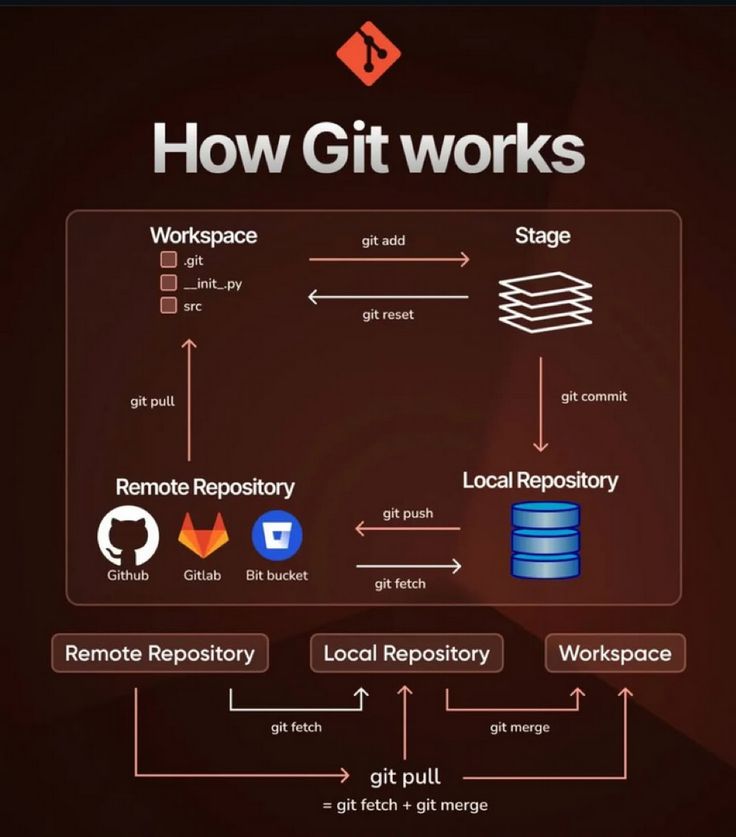
Git works in three main stages:
- Working Directory – Where you edit files
- Staging Area – Files ready to be committed
- Repository – Where committed changes are stored
Basic Git Workflow
- Modify files in the working directory
- Add files to staging using
git add - Save changes using
git commit - Push code to remote repository using
git push
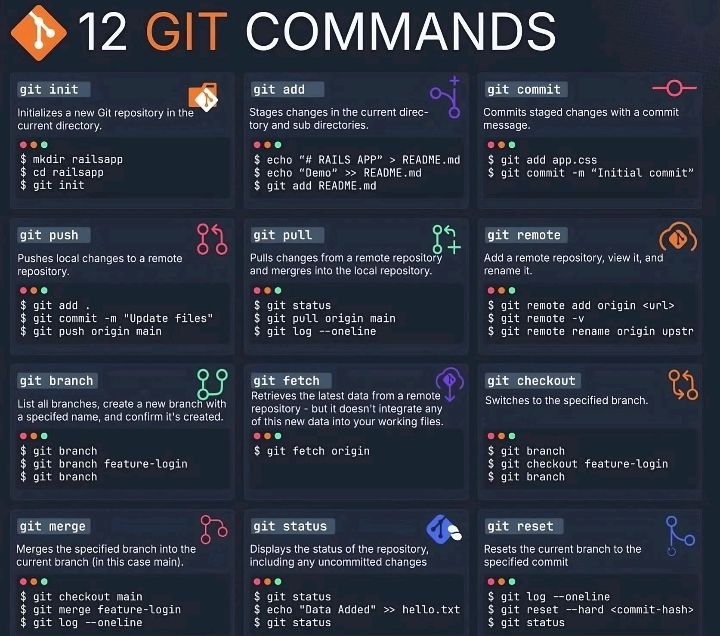
Common Git Commands
- git init – Initialize a new Git repository
- git clone <url> – Clone an existing repository
- git status – Check current status
- git add . – Stage all changes
- git commit -m "message" – Save changes with message
- git push – Upload changes to remote repository
- git pull – Fetch and merge remote changes
What is GitHub?
GitHub is a platform to host and collaborate on Git repositories.
What is GitHub?
GitHub is a cloud-based platform that hosts Git repositories. It allows developers to store code online, collaborate with others, track issues, review code, and deploy projects.
Why GitHub is Used?
- Online backup of code
- Collaboration with teams
- Showcase projects to recruiters
- Supports CI/CD and deployment
Difference Between Git and GitHub
- Git is a version control tool
- GitHub is a platform that hosts Git repositories
What is a Repository?
A repository (repo) is a storage location where project files and their history are stored. It can be local or remote.
Branches in Git
A branch is a separate line of development. The main branch usually contains stable code, while other branches are used for new features or fixes.
What is Commit?
A commit is a snapshot of changes made to the project. Each commit has a unique ID and a message describing the change.
What is CI/CD in GitHub?
CI/CD stands for Continuous Integration and Continuous Deployment. GitHub supports CI/CD using GitHub Actions, which automatically builds, tests, and deploys projects whenever code is pushed.
GitHub Pages
GitHub Pages allows developers to host static websites directly from a GitHub repository. It is commonly used for portfolios and documentation sites.
Importance of Git & GitHub for Frontend Developers
- Manages project versions
- Helps in team collaboration
- Required skill for jobs and internships
- Supports deployment and CI/CD